Best Gaming Chairs for Long, Comfortable Sessions
The best gaming chairs should do more than look good beside your gaming setup. They should support your back, keep you comfortable during long sessions, and give you enough adjustability to find a natural sitting position.
There is no single chair that works perfectly for everyone. A shorter user may need a different seat depth from a taller person, while someone who works and games at the same desk may prefer a more understated ergonomic design.
For most people, the best place to start is with a chair that offers adjustable height, reliable lumbar support, a comfortable seat, adjustable armrests, and a recline function. From there, your budget, body size, preferred materials, and daily use can narrow the choice.
The Best Gaming Chairs
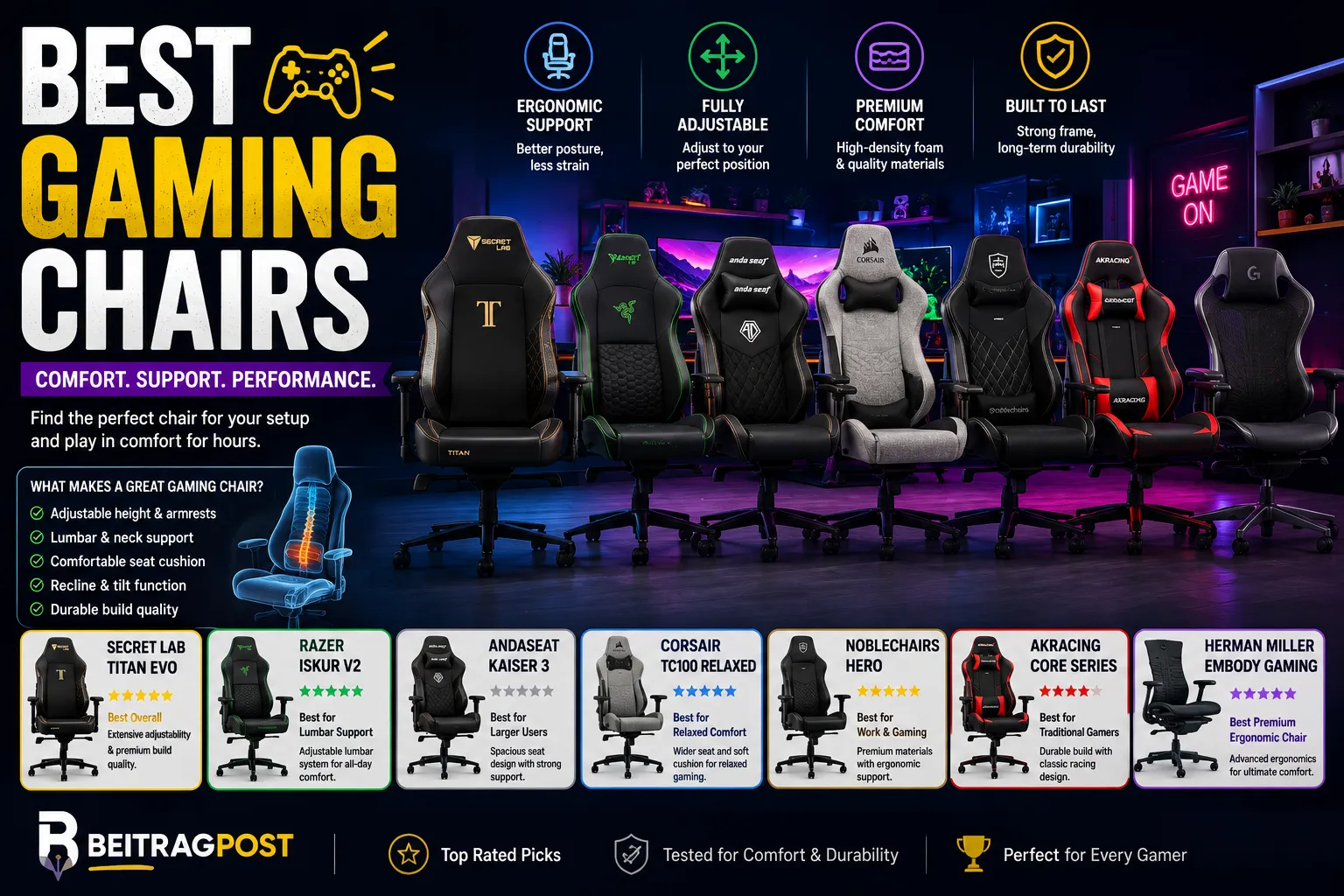
| Gaming Chair | Best For | Standout Feature | Style |
|---|---|---|---|
| Secretlab TITAN Evo | Overall choice | Extensive adjustability | Racing-inspired |
| Razer Iskur V2 | Lumbar support | Adjustable lumbar system | Gaming |
| AndaSeat Kaiser 3 | Larger users | Spacious seat design | Racing-inspired |
| Corsair TC100 Relaxed | Comfort-focused gaming | Wider seating position | Gaming |
| Noblechairs HERO | Work and gaming | Firm ergonomic support | Premium |
| AKRacing Core Series | Traditional gaming style | Strong frame construction | Racing-inspired |
| Herman Miller Embody Gaming | Premium ergonomics | Advanced ergonomic design | Office-inspired |
The Secretlab TITAN Evo is a strong all-around choice for users who want extensive adjustment options. The Razer Iskur V2 stands out if lower-back support is your main priority, while larger users may prefer the space offered by chairs such as the AndaSeat Kaiser 3.
If you spend equal amounts of time working and gaming, premium ergonomic options can also make more sense than a traditional racing-style chair.
What Actually Makes a Gaming Chair Good?
A gaming chair can look impressive and still be uncomfortable after an hour.
The important features are usually less exciting than RGB lighting or aggressive styling.
Seat Comfort
Your seat should provide enough support without forcing you into one rigid position.
Pay attention to:
- Seat width
- Seat depth
- Cushion firmness
- Edge design
- Padding thickness
- Material
A very soft chair may feel comfortable initially but provide less support over long periods. A firmer seat can feel better for users who prefer more structure.
Lumbar Support
Lower-back support deserves serious attention.
Some gaming chairs rely on a removable cushion. Others build adjustable lumbar support directly into the backrest.
Built-in systems can be easier to fine-tune because the support stays connected to the chair as you move.
Adjustability
A chair becomes much more useful when you can adapt it to your body.
Look for features such as:
- Seat-height adjustment
- Recline adjustment
- Adjustable armrests
- Tilt tension
- Adjustable lumbar support
- Headrest adjustment
The more adjustable the chair is, the easier it is to find a comfortable position.
Armrests
Your armrests should allow your shoulders to remain relaxed while you use your keyboard and mouse.
Four-directional armrests can provide more flexibility than basic fixed or two-directional designs.
However, more adjustment isn’t automatically better if the mechanism feels loose or difficult to use.
Base and Casters
The bottom of the chair affects stability and movement.
A solid five-star base with quality casters should roll smoothly without making the chair feel unstable.
If you use the chair on a hard floor, check whether the included casters are suitable for that surface.
Secretlab TITAN Evo
A Strong All-Around Choice
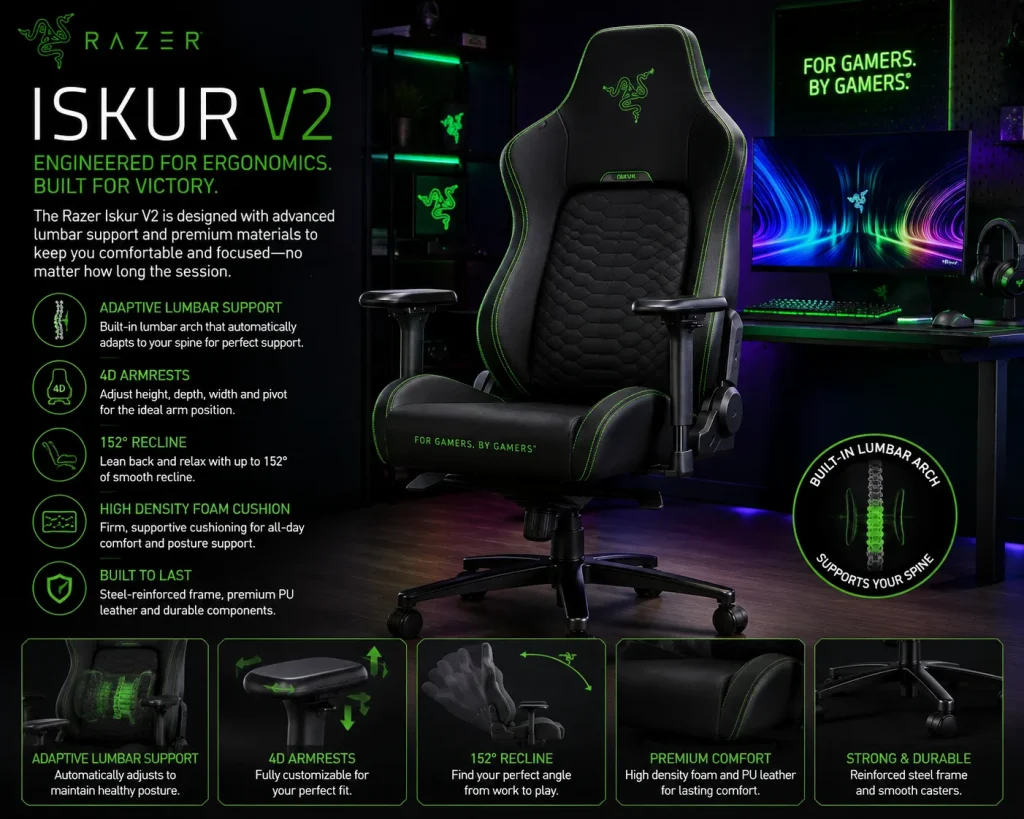
The Secretlab TITAN Evo is designed for people who want a gaming chair with a broad range of adjustments.
It combines a recognizable gaming-chair appearance with features aimed at long-session comfort.
The chair is available in different sizes and upholstery options, which is useful because body proportions can make a major difference when choosing a chair.
Why It Stands Out
The biggest advantage is flexibility.
You can adjust the chair to suit your preferred seating position instead of relying on one fixed configuration.
The built-in lumbar support is also more convenient than constantly repositioning a separate pillow.
Who Should Consider It?
The TITAN Evo makes sense for someone who:
- Games for several hours at a time
- Wants a traditional gaming-chair appearance
- Needs multiple adjustment options
- Uses the same chair for work and gaming
- Wants different size options
One Thing to Consider
It is not the cheapest option available.
If you only game occasionally, spending more on extensive adjustment features may not provide much additional value.
Razer Iskur V2
A Strong Pick for Lower-Back Support
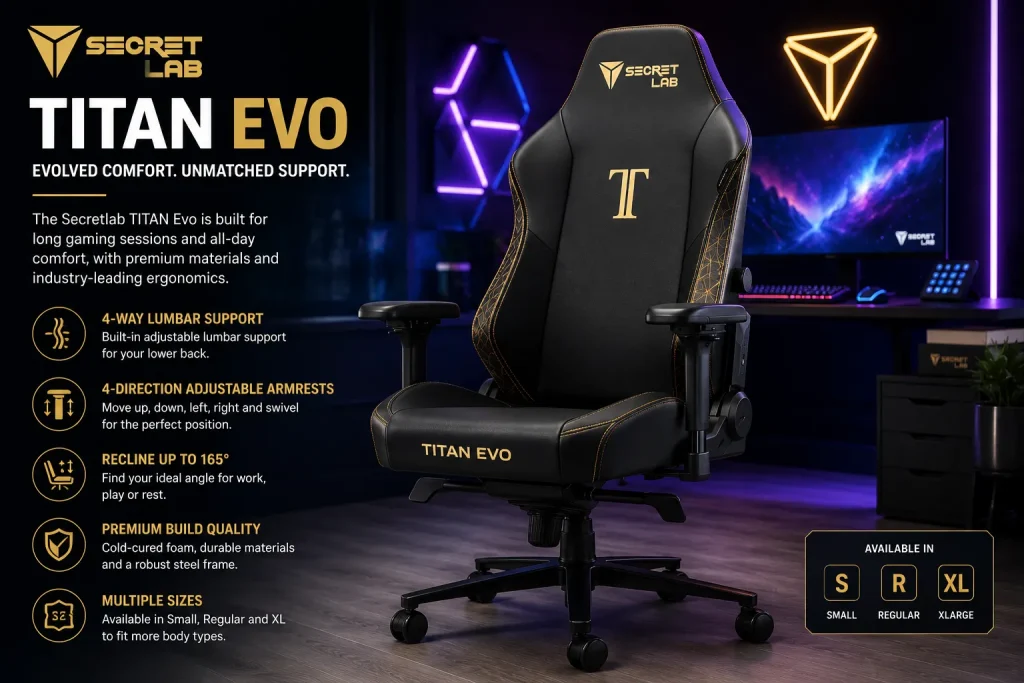
The Razer Iskur V2 puts considerable emphasis on lumbar support.
That makes it particularly interesting for users who find that standard gaming chairs don’t provide enough support around the lower back.
Its design remains recognizably gaming-focused, but the ergonomic elements are more prominent than on many entry-level racing-style chairs.
Where It Makes Sense
The Iskur V2 can be a good fit if you:
- Sit for long periods
- Prefer structured back support
- Want adjustable lumbar positioning
- Like a gaming-focused appearance
The important point is to adjust the lumbar system rather than simply leaving it at its default position.
A support system only helps if it matches your body and sitting position.
AndaSeat Kaiser 3
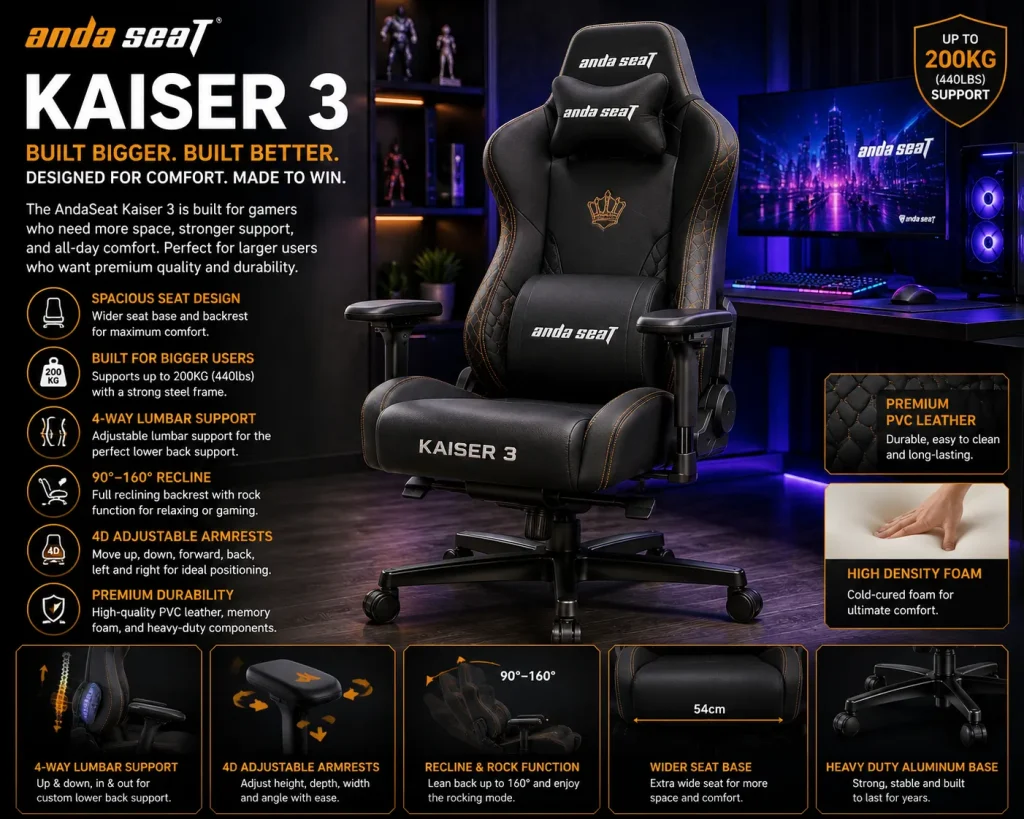
A Spacious Option for Larger Users
Chair dimensions matter more than many buyers realize.
A chair that feels comfortable for one person may feel restrictive for someone with broader shoulders or a larger frame.
The AndaSeat Kaiser 3 focuses on a spacious seating experience while maintaining the familiar gaming-chair design.
Why Size Matters
Before buying any gaming chair, check:
- Recommended height range
- Weight capacity
- Seat width
- Seat depth
- Backrest dimensions
Don’t rely on the product photos.
A chair can look large in a photograph while having a relatively narrow seat.
Best Fit
The Kaiser 3 is worth considering if you want more room to move and don’t enjoy the confined feeling of narrower racing-style chairs.
Corsair TC100 Relaxed
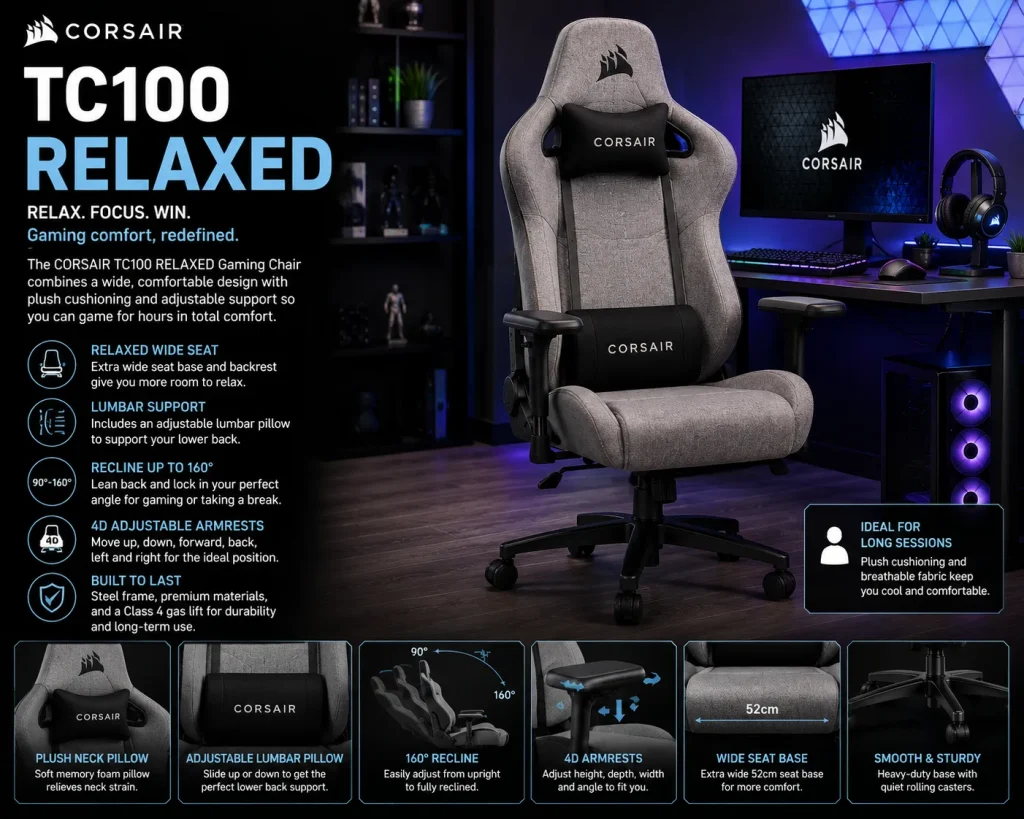
Best for a Less Restrictive Seating Position
Not everyone likes the upright, bucket-style feel associated with traditional gaming chairs.
The Corsair TC100 Relaxed takes a somewhat wider approach to the seat design.
That can make it appealing to users who want more freedom to change position while gaming or working.
Why You Might Prefer It
A more relaxed seat can work well if you:
- Shift positions frequently
- Don’t like narrow side bolsters
- Use the chair for general computer work
- Prefer a softer gaming aesthetic
The right chair should allow natural movement rather than forcing you to sit perfectly still.
Noblechairs HERO
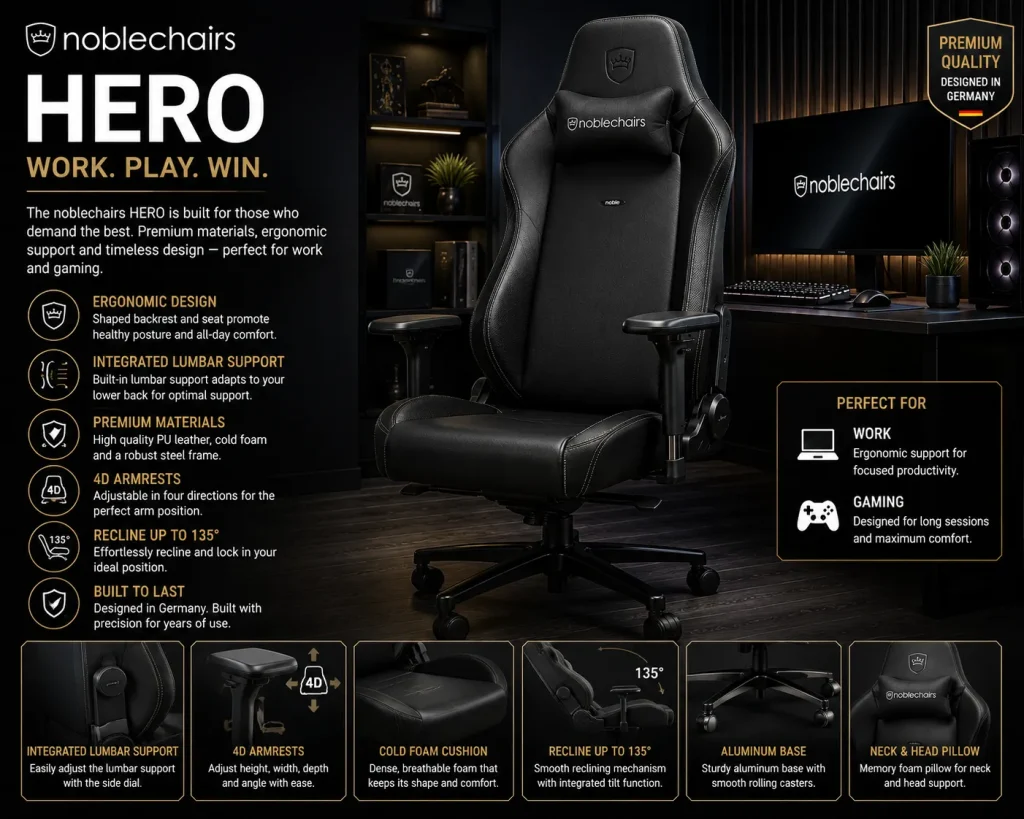
A Better Fit for Work and Gaming
Some gaming chairs are designed almost entirely around their appearance.
The Noblechairs HERO takes a more restrained approach.
Its firm seating and structured back support can make it appealing to people who spend a large portion of the day at a desk.
Why It Works Beyond Gaming
If your computer is used for both entertainment and work, a chair with a more professional design can be easier to live with.
You also don’t need to maintain separate chairs for different activities.
The HERO can therefore make sense for someone who wants gaming-chair features without an overly aggressive racing aesthetic.
The Trade-Off
Firm seating isn’t for everyone.
If you prefer a very soft chair, the HERO may take some adjustment.
AKRacing Core Series
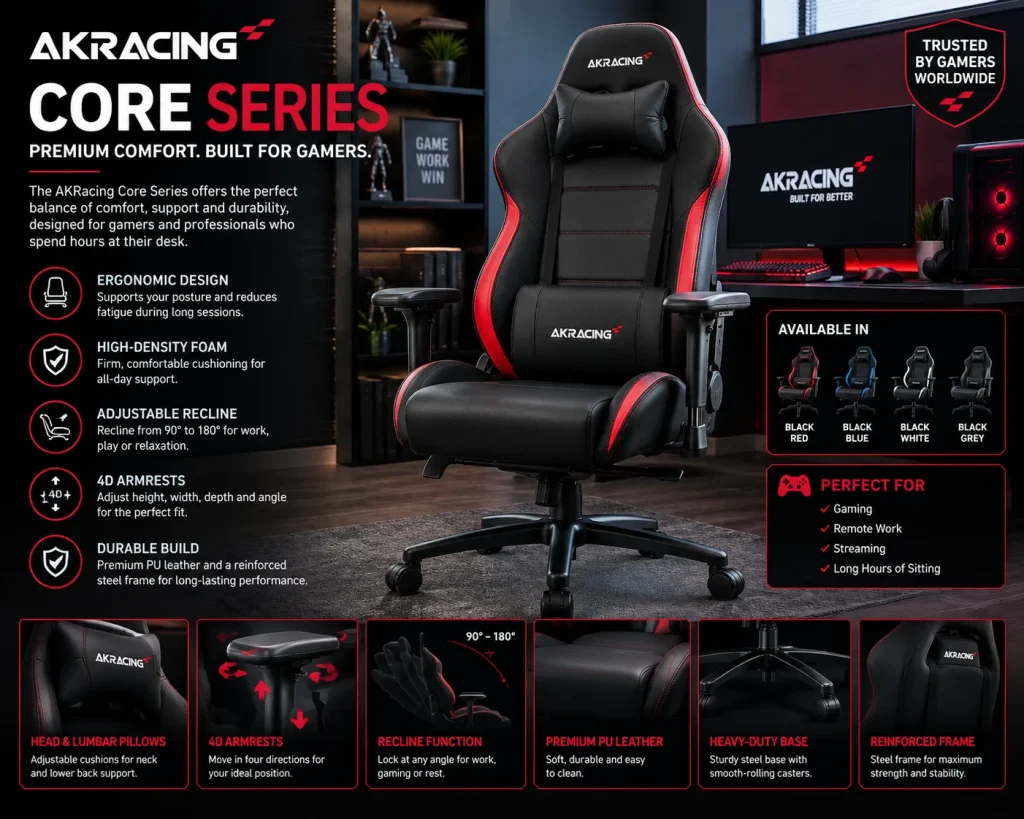
A Traditional Gaming-Chair Choice
AKRacing is another option for people who prefer the classic racing-style gaming chair.
The Core Series focuses on the fundamentals rather than trying to turn the chair into an elaborate piece of gaming hardware.
That can be a good thing.
A chair doesn’t need built-in speakers, excessive lighting, or complicated electronics to be useful.
Who Should Look at It?
Consider this type of chair if you want:
- Racing-inspired styling
- Strong structural support
- Adjustable positioning
- A straightforward gaming setup
It is particularly suitable for users who know they prefer the traditional gaming-chair shape.
Herman Miller Embody Gaming
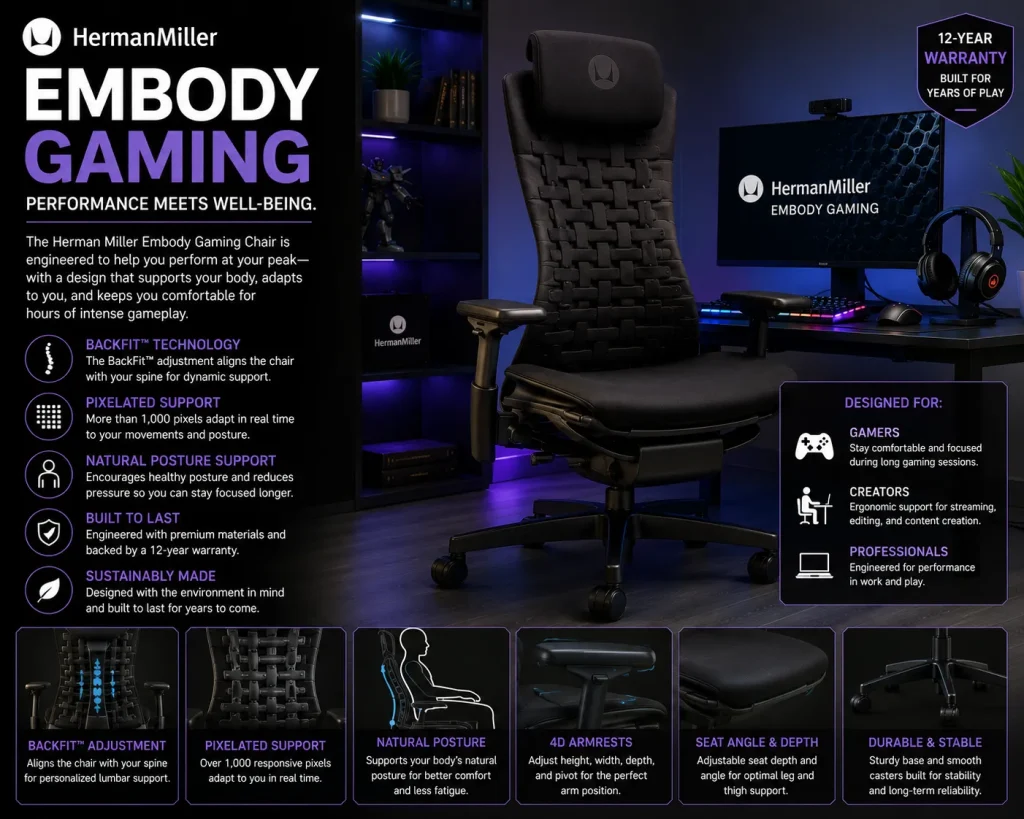
Best Premium Ergonomic Option
The Herman Miller Embody Gaming takes a very different approach.
Instead of starting with the traditional racing-seat design, it is based on an ergonomic office-chair concept adapted for gaming.
That distinction matters.
If you work at your computer all day and then play games in the evening, an office-oriented ergonomic chair may make more sense than a conventional gaming chair.
Why It Is Different
The design emphasizes movement and ergonomic support rather than the bucket-seat appearance common in gaming chairs.
That can make it appealing to users who prioritize comfort and posture over gaming aesthetics.
The Biggest Drawback
Price.
This is a premium purchase, so it makes the most sense for someone who spends many hours at a desk and is willing to invest heavily in long-term comfort.
Gaming Chair vs. Office Chair
The choice isn’t always between one gaming chair and another.
Sometimes the better question is whether you need a gaming chair at all.
| Priority | Gaming Chair | Ergonomic Office Chair |
|---|---|---|
| Gaming appearance | Excellent | Moderate |
| Racing-style design | Strong | Rare |
| Professional appearance | Moderate | Excellent |
| Long work sessions | Depends on model | Often strong |
| Adjustability | Varies | Often extensive |
| Reclining | Common | Varies |
| Seat design | Often structured | Usually more neutral |
| RGB/gaming aesthetics | More common | Rare |
A traditional gaming chair can be the better choice if appearance and a reclining racing-style design matter to you.
An ergonomic office chair may be better if you’re sitting for work most of the day.
There is also a middle ground.
Some premium gaming chairs borrow heavily from ergonomic office-chair design, giving you gaming aesthetics without completely sacrificing workplace comfort.
How to Choose a Gaming Chair for Your Height
Your height affects more than whether your feet touch the floor.
It can change how well the chair supports your back, where the headrest sits, and whether the seat depth feels comfortable.
Shorter Users
Look for a seat that doesn’t extend too far behind your knees.
If the seat is too deep, you may need to sit forward to reach the backrest comfortably.
Average-Height Users
You will usually have more choices, but don’t assume every standard-sized chair will fit equally well.
Compare the manufacturer’s measurements before buying.
Taller Users
Pay particular attention to:
- Backrest height
- Seat depth
- Seat width
- Maximum recommended height
- Weight capacity
A chair can have excellent features but still feel uncomfortable if its dimensions don’t match your body.
What Material Should a Gaming Chair Use?
The material affects comfort, maintenance, appearance, and how the chair feels over time.
Faux Leather
Faux leather is popular because it is easy to clean and gives gaming chairs a premium appearance.
The downside is that it can feel warm during long sessions, particularly in hot environments.
Fabric
Fabric tends to offer a softer and more breathable experience.
It may be preferable if you regularly sit for several hours or live in a warm climate.
The trade-off is that spills and stains can be harder to clean.
Genuine Leather
Genuine leather can feel premium and develop its own character over time.
However, it usually comes at a significantly higher price and requires more care.
For most gamers, the decision will come down to fabric versus synthetic leather.
Don’t Choose a Chair Based on Looks Alone
Gaming chairs are often marketed with aggressive designs, bright colors, logos, and racing-inspired shapes.
Those features can look great in a setup.
They don’t tell you whether the chair will be comfortable.
Before buying, prioritize the things you’ll physically interact with every day:
Seat → backrest → lumbar support → armrests → recline → adjustments
Then consider aesthetics.
A good-looking chair that makes your back or legs uncomfortable will quickly become the least attractive part of your setup.
How Much Should You Spend on a Gaming Chair?
You don’t necessarily need to buy the most expensive chair.
Instead, think about how frequently you’ll use it.
Occasional Gamers
If you only play for a few hours each week, an affordable chair with good basic adjustment may be enough.
Regular Gamers
If you spend several hours gaming every day, investing more in adjustability and support becomes easier to justify.
Gamers Who Also Work at Their Desk
This is where spending more can make sense.
Your chair may be supporting you for eight or more hours each day, not just during gaming sessions.
In that situation, ergonomics should matter more than gaming aesthetics.
Features You Can Safely Ignore
Not every feature deserves your attention.
Some extras sound impressive but have little impact on everyday comfort.
You probably don’t need to prioritize:
- Built-in speakers
- Excessive RGB lighting
- Decorative cushions
- Aggressive branding
- Complicated electronic features
Unless these features genuinely matter to you, spend the money on better materials and adjustability instead.
A Better Way to Set Up Your Gaming Chair
Even an excellent chair can feel uncomfortable if your desk setup is poorly adjusted.
Your feet should rest comfortably on the floor.
Or Your knees should remain in a natural position.
Your elbows should stay reasonably close to your body while using the keyboard and mouse.
The monitor should also sit at a comfortable viewing height.
If you’re building the rest of your workspace too, our guide to Best Home Office Desk Setup can help you create a more complete workstation rather than choosing a chair in isolation.
And once your setup is ready, you can focus on the games themselves with Best Games to Play in 2026.
Common Gaming Chair Buying Mistakes
Buying the Wrong Size
This is one of the easiest mistakes to avoid.
Check the dimensions before placing an order.
Prioritizing Appearance
A chair can look perfect in photographs and feel terrible after two hours.
Ignoring Seat Depth
Seat depth affects how comfortably your legs and lower back are positioned.
Assuming More Padding Means More Comfort
Very soft padding isn’t automatically better for long sessions.
Support and pressure distribution matter too.
Forgetting Your Desk Height
Your chair and desk need to work together.
A highly adjustable chair can’t completely fix a desk that is the wrong height.
Buying Without Checking the Return Policy
Comfort is personal.
If possible, choose a retailer or manufacturer with a reasonable return policy.
Frequently Asked Questions
What is the best gaming chair overall?
The Secretlab TITAN Evo is a strong all-around option because it combines extensive adjustment options with a familiar gaming-chair design. Your ideal choice still depends on your size, budget, and preferences.
Are gaming chairs actually comfortable?
They can be, but comfort varies significantly between models. Seat dimensions, lumbar support, padding, and adjustability usually matter more than the gaming branding.
Is a gaming chair better than an office chair?
Not automatically. A gaming chair may provide the appearance and reclining style gamers prefer, while a high-quality ergonomic office chair can be better suited to long work sessions.
What is the best gaming chair for long hours?
Look for strong lumbar support, adjustable armrests, suitable seat depth, good padding, and a backrest that supports your preferred sitting position. The best model depends on your body dimensions.
Are expensive gaming chairs worth it?
They can be if you use your chair every day. More expensive models often provide better materials, adjustment options, construction, or ergonomic features. However, price alone doesn’t guarantee comfort.
Should I choose fabric or leather?
Fabric is often preferable if breathability matters, while synthetic leather is easier to wipe clean. Your room temperature, cleaning preferences, and personal comfort should guide the choice.
How do I know what gaming chair size I need?
Compare your height and weight with the manufacturer’s recommended range. Also check seat width, seat depth, and backrest dimensions instead of relying only on the chair’s general size label.
Final Verdict
The best gaming chairs aren’t defined by their appearance alone.
For a versatile gaming-focused option, the Secretlab TITAN Evo offers a strong combination of adjustment and comfort. The Razer Iskur V2 deserves attention if lumbar support is your biggest concern, while the AndaSeat Kaiser 3 is worth considering if you need a roomier seat.
If your computer doubles as your workplace, the Noblechairs HERO or a premium ergonomic option such as the Herman Miller Embody Gaming may be a better long-term fit.
Most importantly, choose based on your body, your desk, and how many hours you actually spend sitting.
A gaming chair should make long sessions easier, not simply make your setup look better.